Apple Launched 12 Smart Home Devices. Which Ones Need the Others?

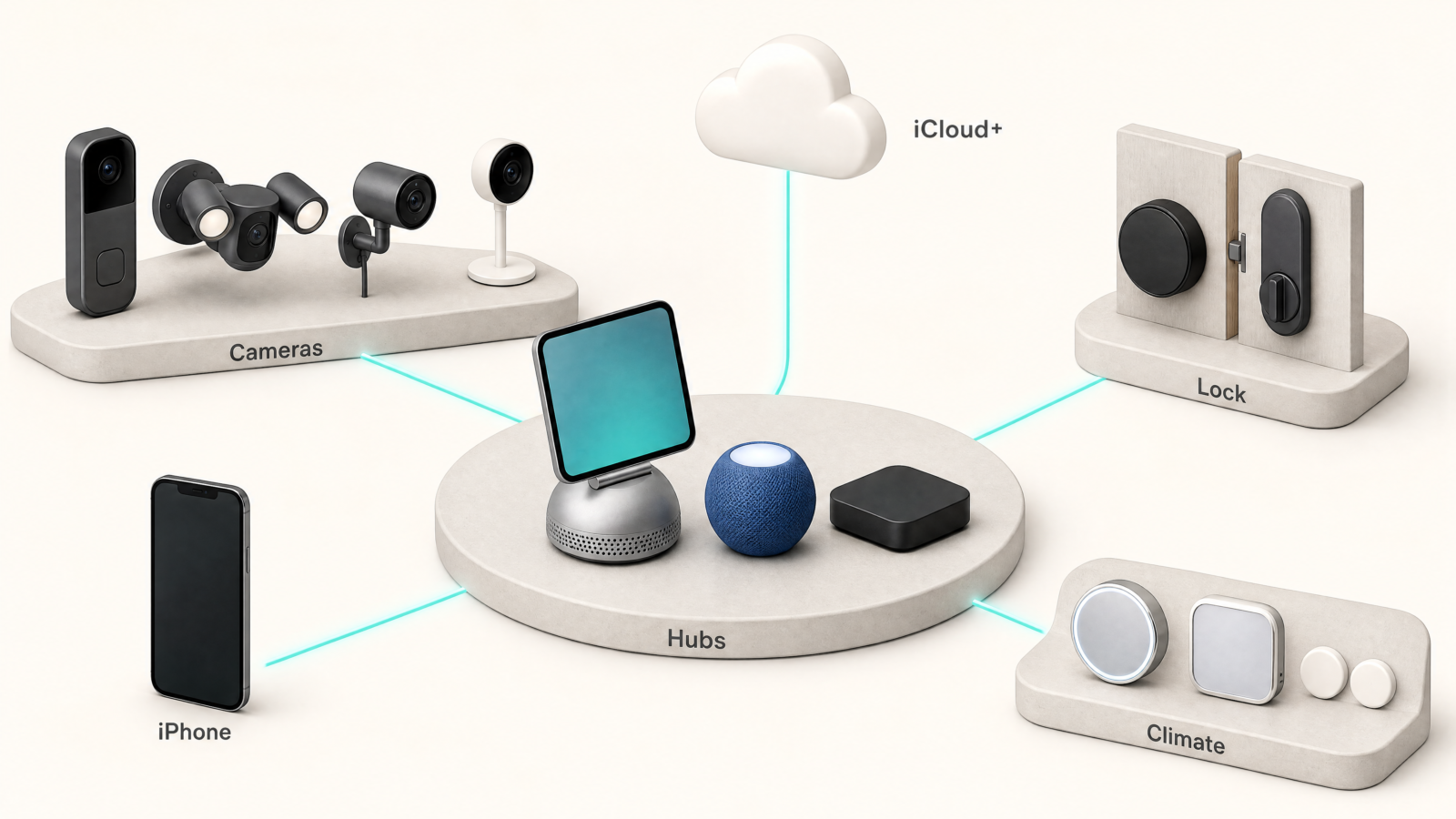
On October 13, Apple announced twelve Apple smart home devices. Three of them are hubs. Nine of them need one.
The short answer: every new accessory runs through an Apple home hub, and you may already own one. A HomePod, a HomePod mini or an Apple TV 4K can do the job. HomeView, the new one with a screen, is optional. Below is what each device does, which ones depend on which, and what they cost to run. Prices are US prices at launch, as announced on October 13, 2026. For the standards underneath, start with what Matter is and why every smart home box has the logo.
Some links in this post are affiliate links. As an Amazon Associate, SmartHomeLabs earns from qualifying purchases, at no extra cost to you.
What a Home Hub Does in Apple Home
A home hub is the Apple device that stays home when you leave. It runs your automations, lets you control accessories while you are away, and handles camera footage.
Apple names four devices that fill the role for its new accessories: HomeView, HomePod, HomePod mini and Apple TV 4K (Apple Newsroom). A HomePod becomes a hub by itself when set up, and an Apple TV does once you assign it to a room in the Home app.
Of the twelve, three are hubs: HomeView, HomePod mini and Apple TV 4K. The other nine are accessories built by LG and Schneider Electric. Mounts and power adapters are not counted.
What Is in the New Apple Smart Home Lineup
HomeView: The Hub With a Screen
HomeView is a 7-inch display on a domed speaker base, with a steel hinge that tilts the screen. It runs on an A18 chip, has a 12MP camera for FaceTime, and comes in silver, starlight, rose pink and space gray. A wall-mounted version in silver and space gray hangs on Schneider Home mounts, sold separately. Both versions cost $299 at launch and ship November 13 (HomeView on Amazon).
HomeView recognizes up to six people by face and gives each one a personal Home Screen. Its Home Camera view shows up to nine feeds at once, and it listens for smoke and carbon monoxide alarms and sends an alert to your other devices.
Siri AI arrives as a beta, and requests that use your Calendar or Messages need a paired Apple Intelligence iPhone or iPad (Apple Newsroom).
HomePod mini and Apple TV 4K: The Hubs Without a Screen
The new HomePod mini keeps its round shape and gains an S10 chip. It costs $149 at launch and reaches stores October 30. Paired with a compatible doorbell or camera, it announces who is at the door. Siri AI comes in a later software update, with no date yet (Apple Newsroom).
The new Apple TV 4K runs on an A19 chip. It costs $299 at launch and ships November 13 (Apple TV 4K on Amazon). As a hub, it processes camera video locally and puts doorbell alerts on your TV (Apple Newsroom).
Either one runs every new accessory. As a hub, HomeView only adds the screen.
The Home Collection: Built by LG and Schneider Electric
The nine accessories in the Apple Home Collection each set up with a single tap from an iPhone, with no separate app or account, and all of them use Thread.
The cameras all come from LG:
- Video Doorbell Wired, $249.95 at launch. Two cameras, one for visitors and one aimed down at packages, plus a spotlight.
- Floodlight Cam, $399.95 at launch. Dual floodlights that switch on with motion.
- Outdoor Cam Plug-In, $299.95 at launch. Color night vision and an adjustable angle.
- Indoor Cam Plug-In, $199.95 at launch. It tilts its lens away from the room when the first person in your household gets home.
The LG Smart Deadbolt Lock, $349.95 at launch, uses Ultra Wideband to unlock as you walk up with your iPhone or Apple Watch. It also has a PIN pad and a hidden backup key, and Apple says core access works without internet.
For heating and cooling, LG and Schneider Electric each make a smart thermostat, $199.95 at launch, and a room sensor, $39.95 at launch. The thermostats can also read the temperature sensors built into HomeView, HomePod and HomePod mini.
Everything ships in December, with some accessories following in early 2027. Apple has not said which. For options outside Apple’s lineup, our smart lock guide and the complete doorbell camera guide cover them.
Thread, Matter and Aliro: The Standards Underneath
Thread is a low-power network that smart home devices use to talk to each other, separate from your WiFi. Every Home Collection device uses it, and Apple says it helps them stay connected if your WiFi drops.
Matter is the shared standard that lets one device work with more than one smart home platform. The lock, both thermostats and both sensors support it. Apple does not say the cameras do.
Aliro is a newer standard for using your phone as a door key. Only the lock supports it.
💡 Tip: If you might leave Apple’s ecosystem one day, the Matter devices are the safest buy here, because the standard keeps them from being tied to one platform.
How to Tell What You Need
- Open the Home app on your iPhone, tap More, then Home Settings, then Home Hubs & Bridges (Apple Support).
- If a HomePod or Apple TV is listed at the top, you already have a hub.
- Check the model. Every Home Collection device uses Thread, and Apple names HomePod mini and the Wi-Fi + Ethernet Apple TV 4K (3rd generation) as hubs that work with Thread accessories.
If you own an iPhone and nothing else from Apple, a HomePod mini is the lowest-cost way in, at $149 at launch. Buy HomeView for the screen itself: a camera wall on the counter, a shared family view, FaceTime in the kitchen. Do not buy it because you think the accessories need it.
⚠️ Warning: Only the person who owns the home in the Home app can add a HomePod or Apple TV as a hub. If someone else set up your home, they have to add it.
What It Costs and What It Leaves Out
- Camera history needs iCloud+. Each camera keeps 10 days of event video with an iCloud+ plan. Apple’s 50GB plan covers one camera, 200GB covers up to five, and 2TB covers unlimited cameras. The hidden math behind smart home subscriptions shows how monthly fees like this add up.
- Region limits. The lock is sold in the US and Canada only, and HomeView skips the European Union.
- Siri AI is not finished. It is a beta on HomeView and a later update on HomePod mini.
- Privacy, as Apple describes it. Apple says Home data is end-to-end encrypted, unreadable by LG, Schneider Electric or Apple, and that footage is processed on your hub or in its Private Cloud Compute. For what smart speakers hear in general, see voice assistant privacy.
Questions to Ask Before You Buy
Do I need HomeView to use the new lock or cameras?
No. A HomePod, HomePod mini or Apple TV 4K works as the hub too.
Will my current HomePod or Apple TV work as the hub?
Most likely, on the latest software. Check an older Apple TV against Apple’s Thread list first.
Does any of it work with Android?
Not for setup. Every accessory is added from an iPhone running the latest software, and the Home app is Apple only.
Can I buy HomeView in Europe?
No. Siri AI is not available in iOS in the European Union, so HomeView is not sold there. It launches in the US, Canada, the UK, Australia, India, New Zealand and Singapore.
One Thing to Do First
Open the Home app and check Home Hubs & Bridges before you spend anything on the Apple smart home lineup. If a hub is already listed, your first purchase can be the accessory you want instead of the hub.