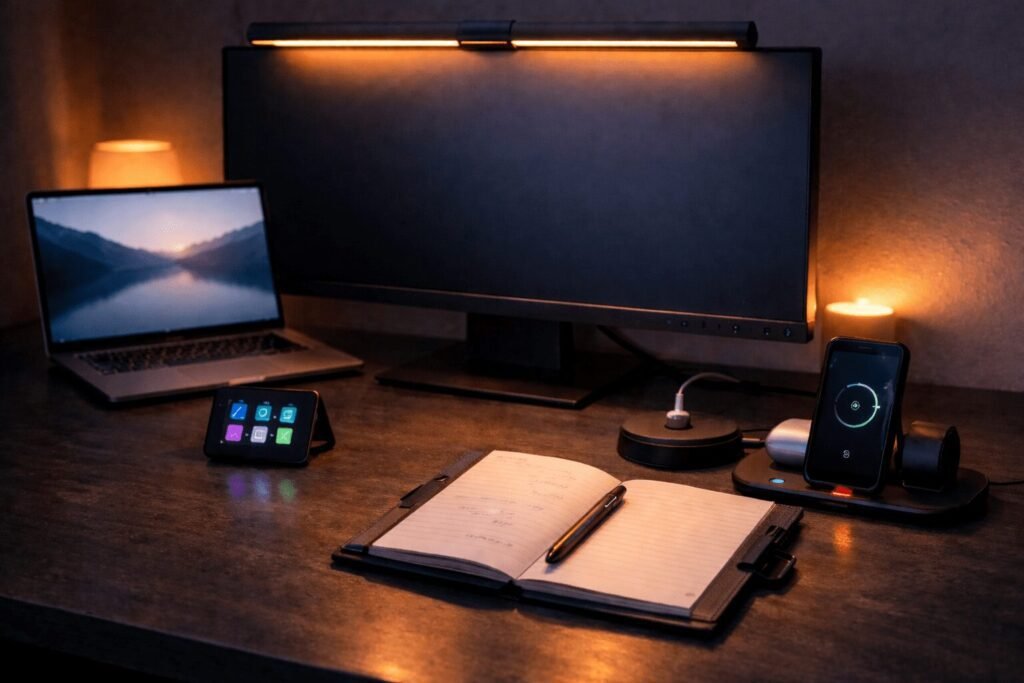
The best work from home upgrades aren’t the expensive ones. They’re the small, smart swaps that make your desk feel intentional, your focus sharper, and your day a little less chaotic. So whether you’re dealing with cable clutter, bad lighting, or a keyboard shortcut graveyard, these eight picks are the work from home upgrades worth your attention in 2026.
Desk Lighting, Finally Done Right
The Xiaomi Mi Monitor Light Bar mounts magnetically to the top of your monitor and lights your entire desk surface without creating any screen glare. That matters because standard desk lamps either sit in the way or throw light at an angle that bounces straight off your screen. This one directs light downward only, so your eyes stop fighting the reflection that builds up over a long work session. The wireless remote adjusts brightness and colour temperature without interrupting what you’re doing, and because it draws power through USB-C from your monitor, there’s no extra cable running to a wall outlet.
Where It Makes a Real Difference
- Flicker-free, anti-glare optics mean your eyes actually feel okay at the end of a long work session rather than tired and strained from hours of fighting screen bounce.
- It mounts on the monitor and takes up zero desk surface, which means your workspace stays clear and you’re not trading one clutter problem for another.
- The wireless remote lets you dial warm or cool light from wherever your hands are, so you stay in your flow instead of reaching across the desk to adjust a physical dial.
Worth mentioning: It draws power through a single USB-C port on your monitor, so if your monitor doesn’t have a USB passthrough port, you’ll need a separate USB adapter. Not a dealbreaker, but worth checking before you order.
Our take: If eye strain after long work days is a real problem, this is the most space-efficient fix available. Buy it if your desk is tight on real estate and your current lighting is making your screen harder to look at.
| Pros | Cons |
|---|---|
| Powers on automatically with your PC so there’s nothing to remember | A single USB-C cable means no power if your monitor lacks a USB port |
| Wireless remote means you adjust brightness and colour temperature without breaking your focus | Only lights your immediate desk area, not the whole room |
| Mounts in seconds with no tools and leaves your full desk surface free | Remote is small and easy to misplace |
One Port, Four Possibilities
Modern laptops ship with one or two USB ports at best, which means most home desk setups involve unplugging something every time you need to connect something new. The Anker 4-Port USB 3.0 Hub ends that entirely by expanding a single port into four, all running simultaneously at up to 5Gbps. Your mouse, keyboard, external drive, and webcam stay plugged in permanently so the setup is always ready. At under $10 it’s also the highest return-on-investment desk upgrade on this list by a wide margin.
Why It’s the First Upgrade to Make
- All four devices stay connected at the same time, which means the workflow interruption of playing “which USB do I unplug” simply stops happening during your workday.
- SuperSpeed 5Gbps transfers move large files between drives in seconds rather than minutes, so batch exports, backups, and file moves stop being a reason to walk away from your desk.
- The compact, heat-resistant build tucks neatly behind a monitor or to the side of a laptop without adding visible clutter to an already busy desk surface.
Keep in mind: This hub is for data transfer only, not device charging. If you need to charge your phone or tablet from the same hub, you’ll want a powered USB hub instead. Also a lightweight unit, so it can shift around without a cable anchor keeping it in place.
The verdict: An obvious buy for anyone with a laptop that shipped with too few ports. At $10, there’s no reason to keep unplugging things when the fix costs less than lunch.
| Pros | Cons |
|---|---|
| Plug-and-play setup with no drivers or software needed | Slim, lightweight build may shift around on a busy desk without a cable anchor |
| SuperSpeed 5Gbps transfer makes moving large files feel effortless | Only four ports, so power users with many peripherals may need a second hub |
| Four ports from one means your full peripheral setup stays connected all day | Not designed for charging devices, data transfer only |
Your Paper Trail, Gone For Good
Identity theft most commonly starts with physical documents, and most people still have a stack of old bank statements, expired cards, and medical paperwork sitting in a drawer or on a desk longer than they should. The Bonsaii 12-Sheet Cross Cut Shredder handles paper, credit cards, staples, and mail in a single pass without sorting, so clearing that pile takes minutes rather than an afternoon. P-4 security level shredding cuts everything into 5x20mm particles, which is a meaningful step up from strip-cut models that leave readable columns anyone can piece back together with patience.
The Case for Having One at Home
- P-4 cross-cut shredding produces tiny 5x20mm particles rather than long readable strips, so sensitive documents are genuinely destroyed rather than just inconvenient to reassemble.
- Five minutes of continuous run time means you can clear a full pile in one session without waiting for the motor to cool down between small batches the way cheaper models force you to.
- Compact enough to live under a desk or in a home office corner, which means it stays accessible and actually gets used rather than getting stored away and forgotten.
One trade-off: The 5.5-gallon bin fills up faster than you’d expect during a big document purge session. If you’re planning to clear out years of paperwork in one go, plan to empty it a couple of times. For regular weekly use it’s perfectly adequate.
In short: If you still have a pile of documents you keep meaning to deal with, this is the push you needed. A cross-cut shredder at this price point with continuous run time and multi-material capability is genuinely good value for a home setup.
| Pros | Cons |
|---|---|
| Shreds credit cards, staples, and paper in one pass so you’re not stopping to sort | 5.5-gallon bin fills up faster than expected if you’re doing a big document purge |
| Auto start/stop and jam-reverse make it genuinely easy to use with no learning curve | Not suited for higher-volume office environments with multiple daily users |
| Transparent window lets you know at a glance when it’s time to empty the bin | 1-year warranty is shorter than some competing brands in this price range |
Three Devices, One Spot
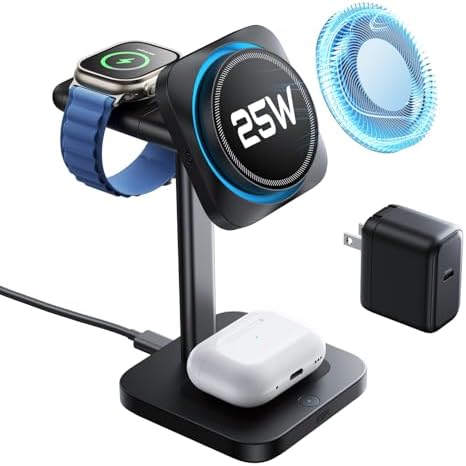
The ESR 3-in-1 MagSafe Charging Station is Qi2.2 certified, which means it delivers 25W wireless charging to iPhone 17 series models, faster than any previous MagSafe standard. Drop your iPhone, AirPods, and Apple Watch onto the stand simultaneously and all three charge at their maximum rates without cable management or prioritisation issues. The built-in CryoBoost cooling actively pulls heat away from your phone during charging, which matters because heat during charging is one of the main contributors to long-term battery degradation. The Apple Watch module is also detachable and charges via USB-C on its own, making it a practical travel companion.
Why Apple Users Specifically Need This
- One compact stand replaces three separate cables and charging blocks, so your desk and nightstand stay clear without having to think about cable management at all.
- CryoBoost active cooling protects battery health over time, not just charging speed, which is a meaningful long-term benefit that most basic chargers simply don’t address.
- Everything is fully charged every morning without thought, which eliminates one of those small daily friction points that quietly drains mental energy before the workday even starts.
Fair warning: This is exclusively an Apple ecosystem product. Full 25W Qi2.2 charging speed also requires iOS 26 or later on the iPhone 17 series, so older models will charge at standard MagSafe speeds. Not the right pick for households that mix Android and Apple devices.
Who should get it: If your desk or nightstand has three Apple charging cables on it right now, this is the obvious consolidation. The CryoBoost cooling alone makes it worth choosing over a cheaper 3-in-1 alternative.
| Pros | Cons |
|---|---|
| Charges iPhone, AirPods, and Apple Watch simultaneously so your whole setup is ready each morning | Requires iOS 26 or later for full 25W Qi2.2 speed on iPhone 17 series |
| CryoBoost cooling actively protects your battery health over time, not just charging speed | Exclusively Apple compatible, so no use in mixed Android households |
| Detachable Apple Watch module works as a standalone travel charger via USB-C | Premium price point compared to basic 3-in-1 alternatives |
Your Notes, Finally Searchable
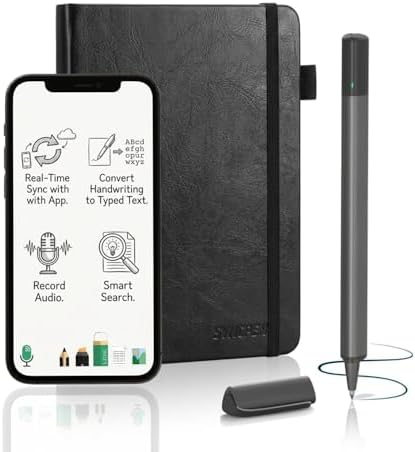
This digital smart pen and notebook set converts handwriting into searchable, editable text across 71 languages in real time, so everything you write on paper is automatically available on your phone, tablet, or computer. The companion app stores notes with unlimited encrypted cloud backup and no recurring subscription, which makes it a meaningful value advantage over platforms like Rocketbook or Moleskine Smart that lock features behind monthly fees. It also records audio in sync with your notes, so you can tap any line later and hear exactly what was being said when you wrote it, which is genuinely useful in meetings and lectures.
What It Changes About Your Note-Taking
- Handwriting converts to typed, editable text across 71 languages automatically, so your ideas go straight from paper into documents, emails, and task lists without a manual transcription step.
- Everything works offline and syncs the moment you reconnect, so writing on a plane, in a café, or anywhere without reliable signal doesn’t create gaps in your notes archive.
- Keyword search finds any note instantly, which means no more flipping back through pages trying to remember which week a specific meeting or idea landed in.
Good to know: The notebook pages are proprietary, so refills aren’t available at your local stationery store. You’ll need to order them directly. Handwriting recognition accuracy is also very good for most people but may struggle with particularly messy or unconventional writing styles.
The short answer: If you prefer writing by hand but keep losing your notes, this is the most practical bridge between analogue and digital available without a monthly fee. Strong pick for students, remote workers, and anyone in frequent meetings.
| Pros | Cons |
|---|---|
| One-time purchase with lifetime app access and no subscription fees | Notebook pages are proprietary, so replacements may be harder to find locally |
| Unlimited encrypted cloud storage keeps your notes private and safe | Audio recording and advanced features may have a short learning curve |
| Works offline and syncs later, so travel and commutes are no problem | Handwriting recognition accuracy may vary with very messy handwriting |
One Strip to Rule Them All
The Gitryin 12-in-1 solves desk cable chaos at the source by building four retractable 40W USB-C cables directly into the power strip itself. When you’re done charging, the cables retract flush into the unit so there’s nothing dangling across your desk. It delivers 40W fast charging per port, which gets most phones to 50 percent in around 20 minutes, and the modular design means a single broken port is replaceable without throwing away the entire unit. Built-in surge protection covers everything connected to it, so your laptop and monitor have one less thing to worry about during a storm.
How It Cleans Up the Whole Desk
- Four retractable cables disappear into the unit when not in use, so the desk stays genuinely clean rather than having visible cable runs along the surface every time someone plugs something in.
- Built-in surge protection means your laptop, monitor, and other expensive gear are covered during power spikes without needing a separate surge bar taking up another outlet.
- Modular construction means a single faulty port gets swapped out without replacing the whole unit, which makes this a much more durable long-term investment than a standard power strip.
One thing to know: All eight ports are USB-C only, so any older devices that still use USB-A will need an adapter. The retractable cables are also fixed length, which limits placement flexibility a little depending on your desk setup.
Is it worth it: If desk cable clutter is a daily frustration and your current setup uses mostly USB-C devices, yes. The retractable design genuinely solves the problem in a way that a standard cable management tray never quite does.
| Pros | Cons |
|---|---|
| Modular design means one broken charger gets replaced, not the whole unit | All eight ports are USB-C only, so older USB-A devices need an adapter |
| 40W fast charging gets your phone to 50% in about 20 minutes | Retractable cables are fixed length, so placement flexibility is limited |
| Four retractable cables eliminate desk clutter for good | Four devices charging simultaneously at full 40W may reduce per-port speed |
Your Desk Just Got an Upgrade
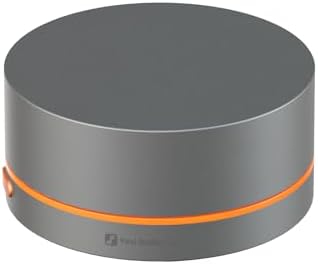
The Fosi Audio VOL20 is a physical volume knob that sits on your desk and controls any Bluetooth or USB audio source with a single smooth turn, so you stop alt-tabbing or clicking through system menus every time a notification comes in too loud or a track starts too quiet. The CNC-machined zinc alloy build feels genuinely premium for the price, and the single-button press handles play, pause, skip, and mute without interrupting what you’re doing. Customisable RGB lighting adds a low-key accent to any desk setup and the glow is subtle enough that it doesn’t become a distraction.
Why It Belongs on Every WFH Desk
- One smooth turn adjusts volume from wherever your hands already are, so you stop breaking focus to hunt through system menus or reach behind a monitor every time the audio level needs fixing.
- Skip, pause, and mute all happen from a single button press, which means staying fully in the zone during deep work or a video call without touching the keyboard at all.
- The CNC-machined zinc alloy casing looks and feels like a piece of premium audio gear, so it adds to the intentionality of a well-considered desk setup rather than looking like an afterthought.
Before you buy: Bluetooth pairs to one device at a time, so switching between your laptop and phone mid-session requires a manual re-pair. RGB customisation is also limited to four preset modes with no app control, which may disappoint anyone looking for deep personalisation.
Our take: If you manage audio from your desk all day and currently do it through a keyboard or screen menu, this is the kind of upgrade that feels obvious the moment you try it. The build quality punches well above the price.
| Pros | Cons |
|---|---|
| Instant tactile volume control without touching your keyboard or screen | Does not support fast-charging adapters, so you need a standard cable to power it |
| Works wirelessly via Bluetooth or wired via USB-C with any device | RGB lighting modes are limited to four presets with no app customisation |
| CNC-machined zinc alloy build feels genuinely premium on a budget | Bluetooth pairing is limited to one device at a time |
Your Shortcut to Getting More Done
The Elgato Stream Deck Mini puts six fully customisable LCD shortcut keys on your desk that can launch apps, trigger macros, mute a Zoom call, switch scenes, or execute any multi-step sequence with a single tap. Each key displays a custom icon so there’s no memorising which button does what, and the drag-and-drop software setup takes minutes rather than an afternoon. For remote workers living in Google Workspace, Zoom, Adobe, or Notion all day, the time saved on repeated manual sequences adds up quickly across a week. The six-key format keeps it compact enough that it doesn’t compete for desk space.
What It Removes From Your Workday
- Every action you repeat throughout the day, from muting a mic to launching a presentation, becomes one button press, which means fewer interruptions to focus and fewer fumbled keyboard shortcuts during live calls.
- LCD keys show exactly what each button does with a custom icon, so there’s no guessing or accidental misfires during important meetings or presentations when the wrong shortcut would be genuinely disruptive.
- Multi-step sequences collapse into a single tap, so repetitive parts of the workday that used to take a minute each start taking seconds and the mental load of remembering them disappears entirely.
Worth knowing: Six keys is enough for most people’s core shortcuts, but heavy multitaskers who want to automate deeply layered workflows may find themselves outgrowing it and looking at the full-size Stream Deck fairly quickly. It also requires the Elgato software running in the background, which adds a small persistent process to your computer.
Worth it when: A strong buy for remote workers, content creators, or anyone who spends their day jumping between apps and repeating the same actions. The Mini is the right entry point if you’ve been curious but not ready to commit to a larger unit.
| Pros | Cons |
|---|---|
| LCD keys show exactly what each button does, so there is no guessing | Only six keys, so heavy multitaskers may outgrow it quickly |
| Drag-and-drop setup means you are up and running in minutes | Requires Elgato software installed, which adds a background process to your computer |
| One tap replaces any multi-step keyboard shortcut instantly | USB only, so no wireless option for cleaner desk setups |
You Might Also Like
-

Unique Father’s Day Gifts for Dad
16–24 minutesFather’s Day gifts don’t have to be hard. The trick is finding something that actually fits how he lives, not…
-

What Do OLED, QLED and Mini-LED Actually Mean
11–16 minutesWalk into any electronics section, and you’ll see a wall of screens all promising the best picture, the deepest blacks,…
-

The Best Outdoor Gadgets and Backyard Accessories for Summer 2026
11–16 minutesSummer evenings outside are better when the setup actually works for you. These are the outdoor upgrades that make your…
-

How to cool down a room fast without AC
6–10 minutesSummer heat in a room without central AC can go from uncomfortable to unbearable fast, especially in a bedroom or…