6 Smart Home Essentials for the Ultimate Connected Living in 2026


Connected living does not mean tearing out walls or spending thousands. The best smart home upgrades are the quiet ones, the gadgets that slip into your day and just make it a little better: cleaner air, better sound, a room that finally feels like yours. Here are six I would hand to anyone starting out in 2026. Not the flashiest picks, but the ones that keep earning their spot long after the novelty fades.
Once the basics are in place, upgrading home security is usually the next thing worth spending on.
Some links in this post are affiliate links. As an Amazon Associate, SmartHomeLabs earns from qualifying purchases, at no extra cost to you.
Breathe Easy, Finally

If you have pets or seasonal allergies, you feel the difference clean air makes. The Levoit Core 300-P uses true H13 HEPA filtration that captures 99.97% of particles down to 0.3 microns, and it is AHAM-verified, meaning that claim was tested by an independent lab instead of just printed on the box.
That verification is the whole point. Plenty of cheaper units cite HEPA-like filters and quietly underperform. This one adjusts its own fan speed as the air changes, and its sleep mode drops to a barely-there 24 decibels, so it runs all night without you noticing.
Why AHAM Verification Matters
- Independently tested H13 HEPA, so the 99.97% capture rate is confirmed, not just claimed.
- Auto mode you never touch, speeding up when it senses particles and settling down when the air is clean.
- 24-decibel sleep mode, quiet enough to leave running overnight in a bedroom.
Worth mentioning: it covers rooms up to about 219 square feet, so a big open-plan space needs a larger model. Replacement filters run around $20 to $25 every six to eight months, so factor that in.
Family, Always Close
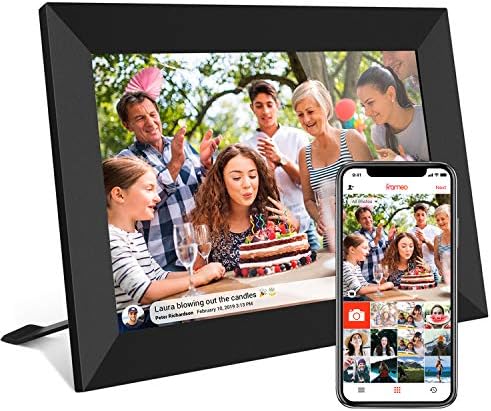
Every family spread across cities knows this ache: the best photos live in phones and group chats and never make it onto a wall. The Frameo 10.1 fixes that for good.
Anyone with the app can send a photo straight to the frame from anywhere in the world, and it shows up in seconds with nothing to do on the frame itself. The screen is sharp enough that pictures actually look good, and 32GB holds thousands of them without any fuss.
Why Non-Tech Family Members Love It
- Anyone can send a photo, so grandparents and kids all join in without needing help.
- Pictures appear instantly, with no setup on the frame end to lose momentum over.
- 32GB of storage, holding years of memories with nothing to delete or manage.
Keep in mind: it needs a steady WiFi connection to receive photos, so it wants a fixed spot rather than travel. The app also occasionally needs a restart after an update to reconnect, worth knowing if you are gifting it to someone without tech help nearby.
Corner Transformed, Instantly

The Govee RGBIC floor lamp lights an empty corner in whatever mood you are after. RGBIC just means each section of the strip can glow a different color at once, so you get real gradients and music-reactive effects instead of the whole thing turning one flat shade.
At 1000 lumens it is mood and accent light, not a replacement for your ceiling fixture, which is exactly the job you want it for. It runs through the Govee app and plays nicely with Alexa, Google Home, SmartThings, and Matter, so it drops into whatever setup you already have.
What RGBIC Actually Means
- Many colors at once, so sunset gradients and reactive animations are on the table, not just one flat hue.
- Works with every major system, Alexa, Google, SmartThings, and Matter, with no separate hub.
- No installation, just stand it in a corner and the room changes, easy to take with you if you move.
Fair warning: it is accent lighting, so it works alongside your overhead light, not instead of it. The cable runs visibly down the stand, and the app has so many scenes it feels cluttered at first.
TV Audio, Actually Fixed

Tinny TV speakers make even a great movie feel flat. The Puxinat soundbar does something clever for the price: it works as one 32-inch bar, or the two halves pull apart to sit either side of the TV as tower speakers, opening up the sound noticeably.
Its two built-in subwoofers add the kind of low-end you would normally need a separate box for, and ten presets cover movies, music, gaming, and clear voice without any fiddling. Bluetooth handles your phone, and the remote runs it all.
The Audio Upgrade That Changes Movie Night
- Splits into two towers, for real stereo separation a fixed bar in front of the screen cannot match.
- Built-in dual subwoofers, giving action and music real weight with no separate sub to place.
- Ten presets, switching the sound for movies, music, or games with no menu-diving.
Good to know: the bass is strong for the money but will not satisfy a dedicated home-theatre setup. Bluetooth also drops through walls, so it is happiest controlled from the same room.
Canned Air, Retired

The Cagiwiru electric duster is one of those tools you never think about until you own one, then reach for constantly. It blows a steady, powerful stream of air the whole time, unlike canned air that fades after a few seconds and goes cold enough to leave moisture on your electronics.
It charges over USB-C, so after you buy it there is nothing else to spend. And it clears dust off keyboards, laptops, vents, camera gear, and car interiors with equal ease.
Why Canned Air Is Worth Retiring
- Steady pressure throughout, staying dry and strong instead of fading and chilling your circuit boards.
- USB-C rechargeable, so there is nothing to buy, replace, or throw away ever again.
- Works everywhere, keyboards, laptops, vents, cameras, and the car, earning its keep across the house.
One trade-off: full speed runs about 10 minutes before a recharge, fine for most cleanups but short for a whole-desk deep clean. It also whines a bit at top speed, and the nozzles are basic rather than precision-fit for narrow gaps.
Big Screen, No Contractor

The NexiGo PJ40 Gen 3 turns a blank wall into a 100-inch-plus screen without a four-figure TV or any installation. It comes factory color-calibrated, so the picture looks right straight away instead of leaving skin tones green or washed out.
It runs 1080p with 4K input, has low enough lag for casual gaming, and has WiFi and Bluetooth built in so there are no cables snaking across the room. The Gen 3 update also fixed the fan-noise complaints of earlier versions.
Where It Makes the Most Sense
- Accurate color from day one, so whites look white and faces look natural with no calibration.
- Low input lag, responsive enough that casual and indie gaming actually feels playable.
- WiFi and Bluetooth built in, so it connects to streaming and speakers with no cable clutter.
Before you buy: it wants a fairly dim room, so big sunny windows will wash the image out in daytime. The built-in 20W speakers are fine but thin next to a real soundbar, and keystone is manual, so squaring the image takes a couple of minutes on setup.